AI character turnaround sheets

Character turnaround sheets from one approved character.

Approve the character once. Ask for the front, side, and back views with the same reference and the identity carries forward. DreamLayer returns the views as separate images; you review proportions and details, then assemble the sheet or hand the views to a modeler.

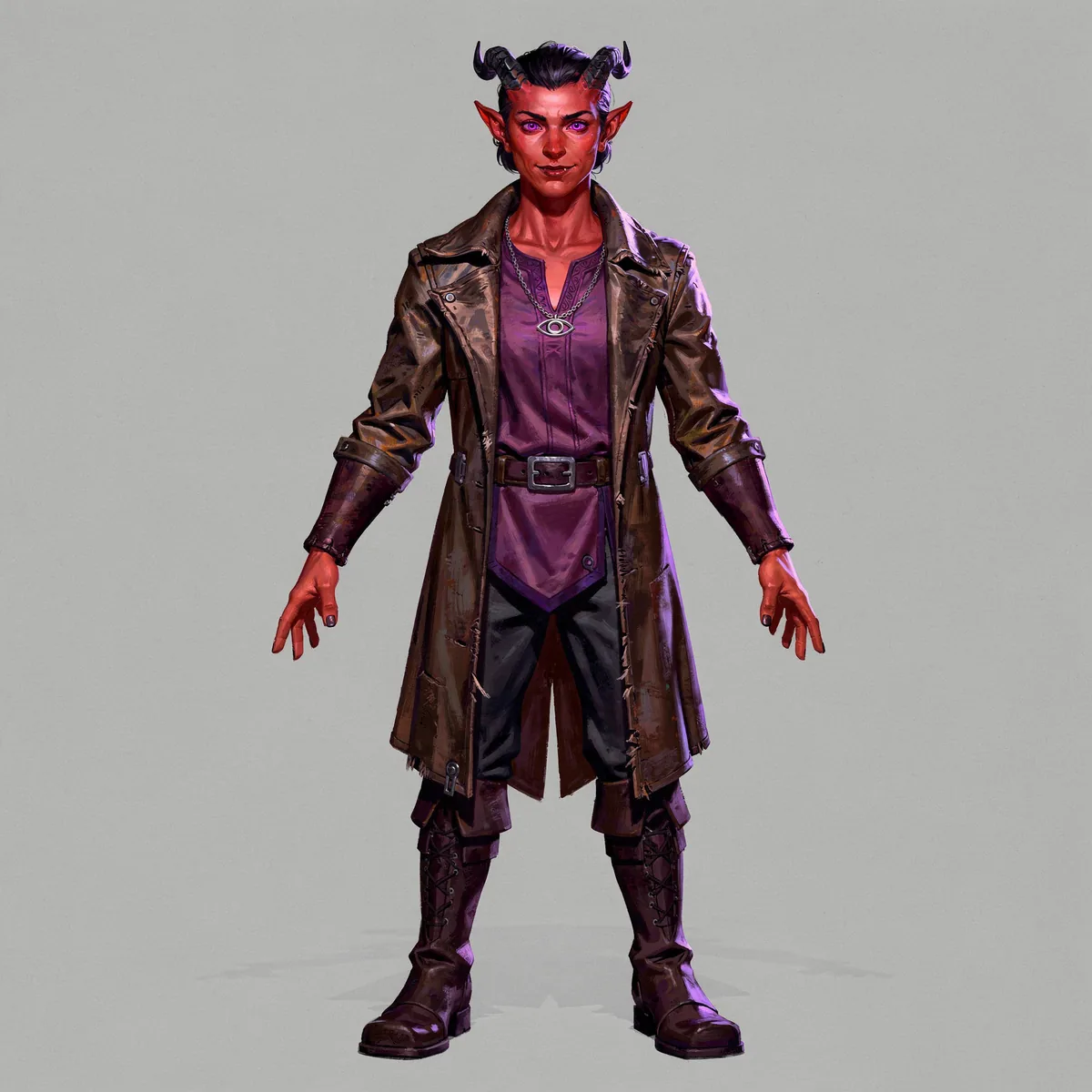
Front view of a tiefling warlock standing in a neutral pose on a flat grey background: crimson skin, curved black horns, violet eyes, a worn leather coat over a purple tunic, a silver eye pendant, dark trousers, and tall laced boots.
01Front view
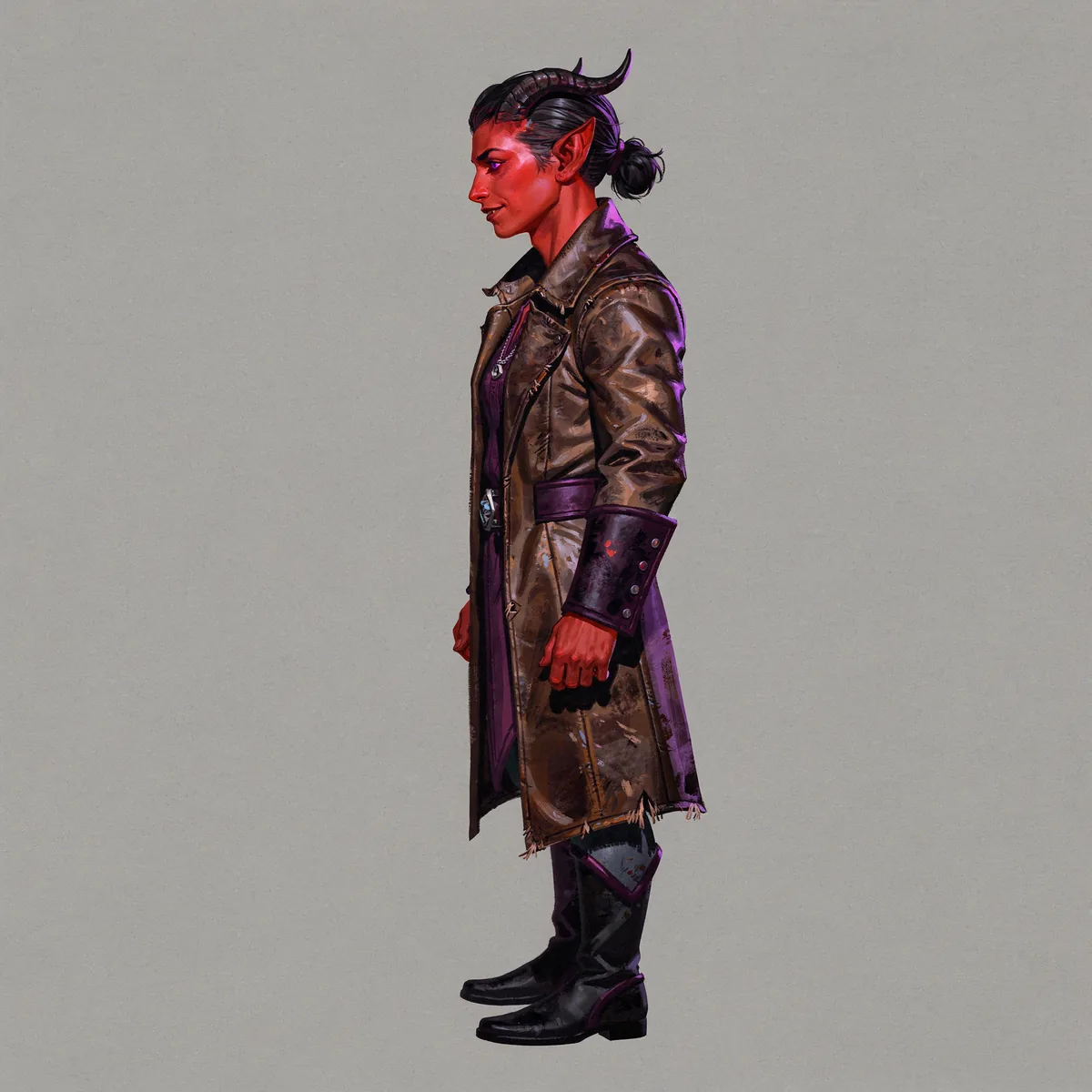
Left profile view of the same tiefling warlock: horns curving back, hair in a small bun, the leather coat with strapped cuffs, the pendant at the chest, plain tall boots.
02Side view
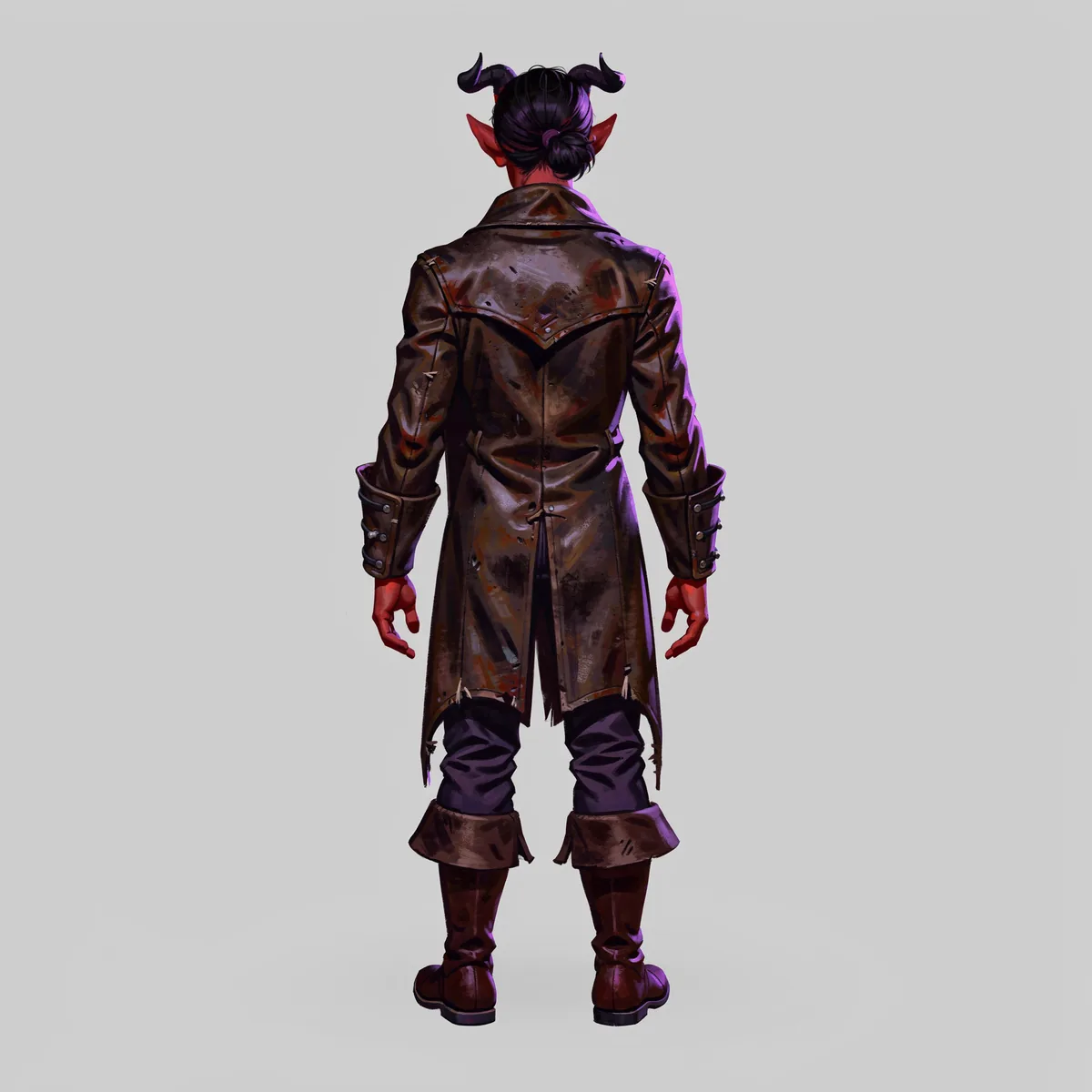
Back view of the same tiefling warlock: horns and a small dark bun from behind, the back yoke of the leather coat, strapped cuffs, and boots with folded brown tops.
03Back view

Front, side, back

Three views of a character turnaround sheet, one reference, three credits.

Made on 2026-09-09 from the tiefling warlock portrait on the D&D character art page. Each view attached that approved portrait as the reference and changed one line of the prompt. The prompts are shown exactly as used, and each card says what held and what drifted.

01 / Same reference

Front view

The reference is a waist-up portrait, so the front view is where the legs, belt, and boots get decided. Approve this one first; it becomes the canon for the rest.

Character turnaround sheet, FRONT view. Keep this exact same tiefling warlock: same face, crimson skin, curved black horns, violet eyes, dark hair, worn leather coat over the purple tunic, silver eye pendant, dark trousers and boots. Full body from head to feet, standing straight in a relaxed neutral pose facing the viewer directly, arms slightly away from the body, feet shoulder width apart, flat even lighting, plain flat light grey studio background, same painterly illustration style, no text, no watermark.

Held: Face, horns, violet eyes, coat, tunic, pendant, and palette all carried from the portrait.

Drifted: Nothing to compare yet. The laced boots and the belt buckle are new decisions the model made here.

Front view of a tiefling warlock standing in a neutral pose on a flat grey background: crimson skin, curved black horns, violet eyes, a worn leather coat over a purple tunic, a silver eye pendant, dark trousers, and tall laced boots.
02 / Same reference

Side view

Same reference, same style words, one line changed: seen exactly from the left side in profile. The horns, the bun, the coat, and the pendant hold.

Character turnaround sheet, SIDE view (left profile). Keep this exact same tiefling warlock: same face, crimson skin, curved black horns, violet eyes, dark hair tied back, worn leather coat over the purple tunic, silver eye pendant, dark trousers and boots. Full body from head to feet, standing straight in a relaxed neutral pose seen exactly from the left side in profile, arms relaxed at the sides, flat even lighting, plain flat light grey studio background, same painterly illustration style, no text, no watermark.

Held: Horns, hair tied back, coat and its strapped cuffs, pendant, coat length, and the frayed hem.

Drifted: The boots lost the front view's lacing. The first attempt at this view failed on the provider side and was simply run again.

Left profile view of the same tiefling warlock: horns curving back, hair in a small bun, the leather coat with strapped cuffs, the pendant at the chest, plain tall boots.
03 / Same reference

Back view

The view the portrait never showed. The model has to invent the back of the coat and the hair, so this is the one to check hardest against the other two.

Character turnaround sheet, BACK view. Keep this exact same tiefling warlock: same crimson skin, curved black horns, dark hair tied back in a small bun, worn leather coat over the purple tunic, dark trousers and boots. Full body from head to feet, standing straight in a relaxed neutral pose seen exactly from behind, arms relaxed at the sides, flat even lighting, plain flat light grey studio background, same painterly illustration style, no text, no watermark.

Held: Horns, the bun, the coat's yoke and strapped cuffs, the frayed hem, and the palette.

Drifted: The boots gained folded brown cuffs and the trousers show more than in the front view. Fix by naming the boots in every prompt, or by using the approved front view as the reference instead of the portrait.

Back view of the same tiefling warlock: horns and a small dark bun from behind, the back yoke of the leather coat, strapped cuffs, and boots with folded brown tops.

What held, what drifted

Identity carried. Boots did not.

Across the three views the character is the same person. The parts the reference never showed are where the model made its own decisions, and it made a different one each time. That is the review step, not a failure of the workflow.

Held in all three

  • Face and horns. Crimson skin, the curve and length of the horns, violet eyes where visible.
  • The coat. Worn brown leather, the strapped cuffs, the frayed hem, the purple tunic underneath.
  • The pendant. Silver eye pendant on a chain, present in the front and side views.
  • Palette and style. Same painterly finish and the same flat grey studio background.

Drifted

  • Boots. Laced in the front view, plain in the side view, folded brown cuffs in the back view.
  • Coat length. Varies by about a hand's width between the views.
  • Hair. Short in the portrait, tied back in a bun in the side and back views because the prompt asked for it. Say the same thing in every prompt.

How to close the gap

  • Chain the reference. Approve the front view, then generate the side and back from it rather than from the portrait, so the boots and belt already exist in the reference.
  • Name the invented parts. Once you have approved the front view, write the boots, belt, and hem into every later prompt in the same words.
  • Regenerate the miss, not the set. One view that drifts costs one credit to run again.

How to run it

The same three requests, from the browser or from your coding agent.

In the browser

Generate or upload the character, approve it, and keep it on the canvas as the reference. Ask for the front view. Approve that, then ask for the side and back views with the same wording and one line changed.

Open DreamLayer

From Claude Code, Codex, or Cursor

The DreamLayer MCP server exposes the same operation the examples used: image_to_image with the approved image as input_asset_id and the view prompt. Ask your agent to run the three views in order, save each result, and stop after each one so you can approve it.

API, CLI, and MCP server

From the API or CLI

Upload the reference once, then submit three image-to-image jobs with the same asset id and the three prompts. Jobs are durable and return an asset id per view; the documentation covers the request shape and the CLI equivalents.

One credit per finished image

Before you use the sheet

Five things to check across the views.

Each view was generated on its own, so the sheet is only as consistent as your review. Use the approved front view as the ruler.

  1. Silhouette and proportionsHead height, shoulder width, and arm length should match the front view within a few percent. Scale the images to the same head height before you compare.
  2. Accessory placementThe pendant, the cuff straps, the belt buckle, and anything asymmetric should sit on the same side in every view.
  3. PaletteCoat, tunic, skin, and hair colors should match without adjustment. If one view shifted warmer or cooler, regenerate it rather than color-correcting.
  4. Feet on one baselineAlign the feet and check that each view stands at the same height; the generated files are not pre-aligned.
  5. Anything the reference never showedLegs, boots, the back of the coat, the hair from behind. Approve those in the front view first, then chain from it.
The approved front view of the tiefling warlock, used as the ruler for the side and back views.
The approved front view. Everything else on the sheet is checked against it.

What this page is not

Fixed views, not a rotation.

  • Not a 360 turnaroundDreamLayer returns fixed views as separate images. It does not render a rotation, a GIF, or a video turntable.
  • Not a 3D model or a rigThe views are 2D illustrations for a modeler or animator to work from. Hero Forge, Blender, and similar tools make the model.
  • Not a sprite sheetAnimation frames are a different workflow: DreamLayer makes the frames and your coding agent assembles the sheet. See game asset creation.

Questions, answered

Character turnaround FAQ.

DreamLayer is currently in beta. If you hit an issue or need a workflow we do not cover yet, email mackenzie@dreamlayer.io. The same account works in the browser and through the API, CLI, and MCP server; pricing is on the pricing page and rights to your images are in the Terms. Making portraits and scenes for a tabletop campaign? See D&D character art.

What is a character turnaround?

A set of views of one character from fixed angles, usually front, side, and back, sometimes with a three-quarter view. Concept artists draw them so modelers, animators, and other artists can build the same character. On this page the views are generated from one approved reference instead of drawn, and reviewed the same way.

Can I get a 360 turnaround or a rotation?

No. DreamLayer returns fixed views as separate images, one per request. It does not produce a rotating animation, a GIF, or a 3D model. If you need a rotation, hand the approved views to a modeler or an animation tool.

Do all three views come from one request?

No. Each view is its own image and its own credit, generated from the same reference with one line of the prompt changed. Three views cost three credits. Keeping the requests separate is what lets you approve the front view before the others are made.

Does it work for pixel art, anime, or cartoon styles?

Name the style in the prompt and keep the style words identical across the views. The examples here use a painterly illustration style; ink, cartoon, anime, and pixel art also work. Pixel art views need a review pass for stray colors before they go into a sprite pipeline.

Can I use my own drawing as the reference?

Yes. Attach a PNG, JPEG, or WebP of your character and describe what must stay the same. A clean front view with a plain background gives the best carry-forward; a busy scene gives the model more to misread.

Can I add a three-quarter view or an expression sheet?

Yes. Any extra view is another request with the same reference: three-quarter, a head-and-shoulders expression set, or the character holding a prop. Review each one against the approved front view before you add it to the sheet.

How much does it cost?

One credit per finished image, at US$0.17 per credit, with a minimum purchase of 59 credits. A three-view set is three credits. Credits do not expire, an unfinished request restores the reserved credit, and there is no subscription.

Do I own the images?

Yes. Under the Terms of Use, DreamLayer assigns the generated Outputs to you. You are responsible for making sure your use is lawful, for example when a character is based on someone else's protected design.

Start with the front view

Approve the character once. Get the other views from it.

One credit per finished image. Three views, three credits, and a review pass that you would do for a drawn sheet anyway.